Purpose |
|
|
|
Login Using Wizard |
Content |
|||||||||||
|
Creates one or more Samples using a "Login Method". The Login Method lets you add details of SDIs associated with the Samples.
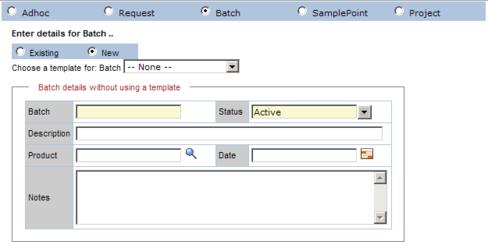
For example, assume a Sample is generated in Batches... in other words, there is a foreign key link between Sample and Batch SDCs. It follows that details concerning the Batch are desired along with the Sample information. In this case, when creating the Sample, you would use the "Batch" Login Method to link the Sample with a Batch. The Batch is then created with the Sample (or an existing Batch is used, depending on the option selected).
Description |
|
|
| Page 1 |
|
The "Adhoc" option does not create any other SDIs.
|
|
Any other option lets you choose an existing SDI with a link to Sample...
...or create a new SDI...
|
| Page 2 |
Page 2 of the wizard redirects to the Quick Login wizard.