Purpose |
|
|
|
Multiple Login |
Content |
|||||||||||
|
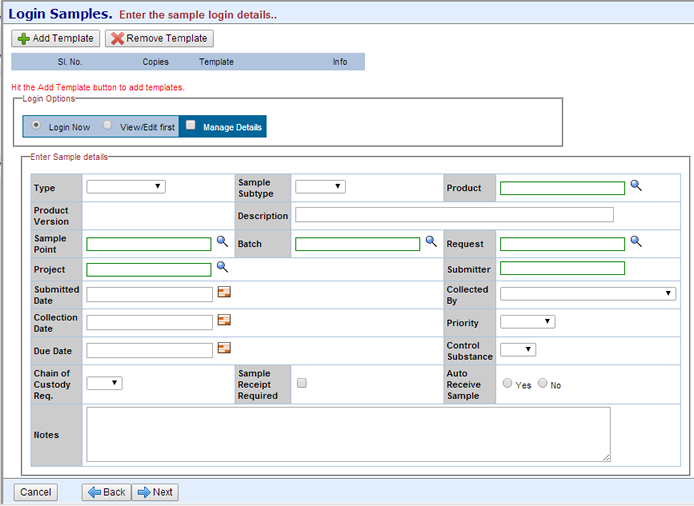
Creates one or more Samples from one or more Sample Templates.
| Field | Description |
| Add Template
Remove Template |
Adds or removes a Sample Template. |
| Copies | Number of Samples to create. |
| Template | Sample Template on which the Samples are based. |
| Login Now | Creates all Samples using the same information, i.e., whatever you enter on this Maintenance Form. |
| View/Edit First | Loads a Maintenance Grid into Page 2 of the wizard, which lets you specify information for each Sample. |
| Type | Sample Type to be associated with the Samples. |
| Sample Subtype | Choose a Sample SubType. Optionally, choose a SubType without specifying a Sample Type, the Sample Type fills in. See Sample Types for more information. |
| Product | Product to be associated with the Samples. In the Product description, see the note about Specification Versions. |
| Sample Point | Sample Point to be associated with the Samples. |
| Batch | Batch to be associated with the Samples. |
| Request | Request to be associated with the Samples. |
| Project | Project to be associated with the Samples. |
| Submitter
Submitted Date |
User who is creating the Samples, and the date being submitted for login. |
| Collected By
Collection Date |
User who will collect the Samples, and the date they will be collected. |
| Priority | Use this to indicate urgency. |
| Due Date | The Sample List page contains an icon that indicates this as a due date and warns when it has passed. |
| Control Substance | Use this to indicate a controlled substance. |
| Chain of Custody Req | Determines whether or not a Chain of Custody will be started for the Samples. |
| Auto Receive Sample | Determines whether or not the Sample status changes to "Received" immediately after login (see Sample Life Cycle). |
| Notes | Use this to enter descriptive text. |
| Page 2 |
If you chose to "View/Edit First", this lets you specify information for each Sample.

|
| Page 3 |
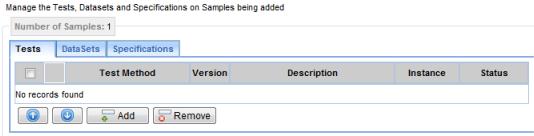
If "Manage Details" is checked, you can add Tests, Data Sets, and Specifications at this time. The Sample List page then loads.
 |
If "Manage Details" is not checked, the Sample List page loads without displaying the above detail elements.